
Craft Explore: Block Builder
LogicLabs LimitedSimulation
3.679.00 Reviews
- Version
- 0.6.5
- Installs
- 10.00M
- Age Rating
- Everyone 10+
Screenshots
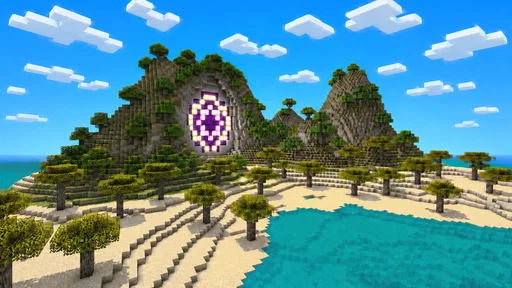
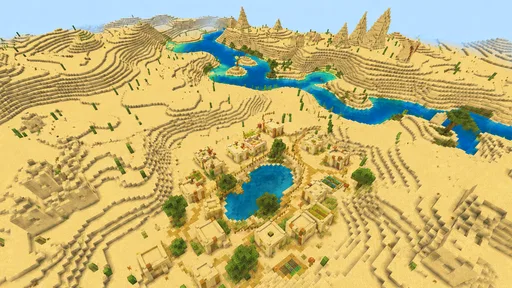
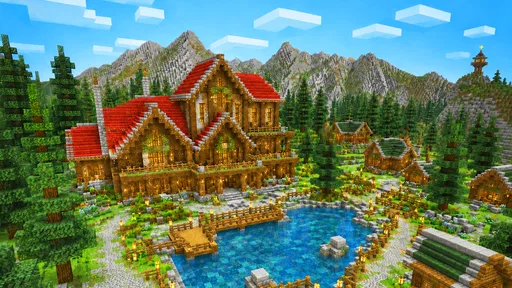
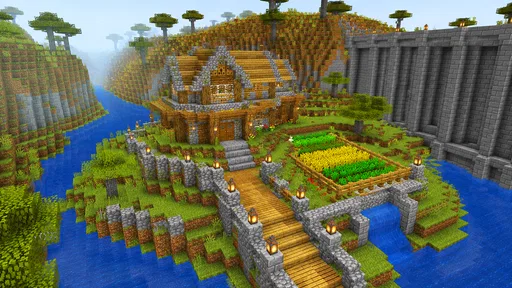
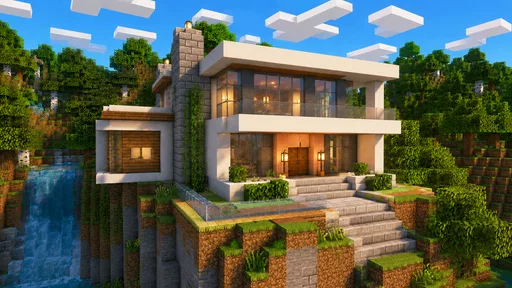
Our Review of Craft Explore: Block Builder
 Analysis by Appyee
If you're anything like me, the allure of an open-world building game is irresistible. Enter Craft Explore: Block Builder, an app that promises endless creativity and exploration. As someone who’s spent countless hours stacking blocks and crafting worlds, I was eager to dive into this virtual sandbox. Let’s explore what this app has to offer and whether it lives up to the hype.
Why the first sessions are appealing
For a new player, the strongest early draw is the simple loop of looking at an empty space and deciding what it could become. I like that this kind of block-based setup makes a project feel approachable: a small shelter or path can be a satisfying start, without requiring a detailed plan for an entire world. When I have only a short break, that open-endedness makes it easy to begin with one manageable idea rather than treating play like a large commitment.
A useful way to keep those first sessions enjoyable is to set a small building goal before starting. I might decide to shape a little courtyard, connect two areas with a walkway, or experiment with a repeated pattern. That gives the session a natural stopping point and makes it easier to return later with a fresh idea. The trade-off is that players who need explicit missions, a campaign, or a clear sequence of rewards may find a sandbox less directing than they want.
Who is likely to enjoy this kind of play?
I’d point this game toward players who enjoy making their own goals and seeing a space take shape block by block. It can suit someone who wants a relaxed creative outlet, a younger player drawn to colorful worlds, or friends who like the idea of working on a shared construction. The age rating is Everyone, and the game is free, so trying it does not require an upfront purchase. That makes it easier to see whether its style clicks before deciding to give it regular time.
I would be more cautious about recommending it to someone who wants a tightly guided simulation with detailed management systems, a story that constantly pushes them forward, or a competitive challenge as the main attraction. The appeal here rests on building and exploring, not on a promise of a structured career or a demanding strategy campaign. If you usually lose interest once a game stops giving you obvious objectives, it may be better to choose a builder with a more defined progression path.
For an everyday example, imagine opening the game after dinner with twenty minutes free. Rather than attempt a grand build, I’d work on one corner of a settlement: decide where a small entrance should go, test a couple of shapes, and leave the next section for another session. That approach makes a casual visit feel productive without turning a hobby into homework. It also gives returning players a practical reason to continue: there is a visible next step, even if the overall project remains entirely self-directed.
First Impressions and User Interface
Upon launching Craft Explore: Block Builder, I was greeted by a clean and straightforward user interface. The main menu is intuitive, making it easy to jump into different game modes. Whether you're a seasoned builder or a newcomer to the genre, the UI is designed to be user-friendly. I appreciated how the app doesn’t bombard you with too many options at once, allowing for a smoother onboarding experience.
The graphics are vibrant and blocky, reminiscent of classic voxel-based games. While not ultra-realistic, the charm lies in its simplicity. The animations are smooth, and I didn’t encounter any lag, which is always a plus. It's clear the developers focused on performance, ensuring that even older devices can run the game without a hitch.
Game Modes and Features
The app offers two primary modes: Creative and Survival. In Creative Mode, you have unlimited resources at your disposal. This is perfect for those who want to focus on building intricate structures without the hassle of resource management. I found myself spending hours crafting castles, villages, and even intricate labyrinths.
Survival Mode, on the other hand, adds a layer of challenge by introducing resource collection and health management. You’ll need to gather materials, craft tools, and fend off hostile creatures. It’s a thrilling experience that keeps you on your toes, adding a strategic element to the gameplay.
"Crafting in Survival Mode feels rewarding and keeps me coming back for more."
One of the standout features is the multiplayer option. Being able to collaborate with friends or other players worldwide elevates the experience. There’s something incredibly satisfying about building a massive fortress with your buddies or showcasing your creations to a global audience.
Using the building options with purpose
The number of choices in a building game can become distracting if I keep switching materials without a plan. I get better results when I settle on a simple palette early: one main material, one contrast, and a third for small details. That restraint helps a structure read clearly, even when it is made from basic shapes. I also find it useful to build a rough outline first, then fill in walls and decoration; otherwise, it is easy to spend time polishing a section that later needs to move.
In a survival-focused session, I’d treat gathering and building as separate jobs rather than constantly interrupting construction to collect more supplies. A short materials run before a larger project can preserve the building rhythm. In creative play, I would do the opposite: try a layout freely, then make a cleaner version once I know the proportions work. These are small habits, but they reduce the frustration that can come from repeatedly undoing or abandoning half-finished ideas.
Customization and Building Tools
Customization is where Craft Explore: Block Builder truly shines. The app offers a plethora of blocks and materials, each with unique textures and colors. The building tools are intuitive, allowing for precision placement and manipulation. I particularly enjoyed the drag-and-drop mechanism, which made constructing complex structures a breeze.
Additionally, the app allows for character customization. You can tweak your avatar’s appearance with various skins and outfits. While this doesn’t impact gameplay, it’s a fun way to express your personal style in the game.
For a longer project, I recommend thinking about navigation as part of the build rather than an afterthought. A visually striking structure is more enjoyable to revisit when its entrances, paths, and useful areas make sense from the player’s point of view. I’d also keep one landmark easy to recognize, so it is simpler to orient myself while exploring. This is a practical design choice, not just decoration: a world that is easy to read is more pleasant to return to than one where every area looks alike.
How it compares with other builders
Compared with a conventional city-building simulation, this kind of block sandbox gives me more direct control over individual structures and less reason to think in terms of budgets, populations, or complex supply chains. That makes it a better fit for hands-on construction and playful experimentation than for people seeking a detailed management model. Compared with a survival-focused crafting game, the appeal is broader because the creative side can be the main event, while the resource-and-health loop offers a different pace for players who want pressure.
Those alternatives can still be the better choice. A player who wants a polished campaign, elaborate automation, or a highly developed social platform should compare options in those areas rather than assume every block builder provides them equally. The useful question is not whether this game can replace every sandbox, but whether its mix of creating, exploring, and survival-style play suits the kind of session you actually want. I see it as a flexible starting point for casual building, rather than a substitute for every deeper simulation.
Community and Updates
The game boasts a vibrant community. From forums to social media groups, players are actively sharing tips, creations, and mods. This sense of community enhances the overall experience, providing endless inspiration for your next build.
The developers are committed to regular updates, adding new content and features. This ensures the game remains fresh and exciting, with new challenges and materials to explore. It’s always a pleasure to see developers who listen to their community and continuously strive to enhance their app.
For lasting value, the important test is what happens after the first impressive build. In my view, a sandbox earns a place on my device when it supports a repeatable routine: make a small plan, spend a few sessions on it, and have a reason to revisit the result. I would not expect every session to feel novel. Some will be mostly gathering, adjusting a layout, or deciding what to build next, and that quieter work is part of the appeal for players who enjoy gradual projects.
There is a maintenance burden, even in a relaxed game: a growing world can become harder to navigate, and unfinished ideas can pile up. I’d keep projects deliberately modest at first and finish one useful area before starting several more. If I stop playing for a while, a clear landmark and a simple next-step goal make it easier to pick up again. Players who prefer games that automatically provide fresh objectives may find that this kind of self-directed upkeep feels like a chore rather than a pleasure.
What may wear thin over time
The same freedom that makes building satisfying can also create decision fatigue. When there is no obvious task, I have to supply the motivation myself; on a tired evening, choosing a project may feel like work. Survival play can add welcome stakes, but resource collection and staying safe may interrupt the calm, uninterrupted construction that some players are seeking. I’d choose a mode according to my mood instead of expecting one style to satisfy every session.
Another possible source of fatigue is repetition. Block-based construction naturally relies on placing and arranging similar pieces, so a large project may require patience and a willingness to make incremental progress. I’d recommend setting a stopping point before a session runs long, especially if the fun has shifted into routine. For players who love gradual craft and visible improvement, repetition can be soothing; for those who want constant new mechanics, it may be the reason to move on.
As a simulation game from Appsgrooves, it has a 3.9 average from around 929 ratings, and it has passed 1 million installs. The release date is November 23, 2025, and the current version is 0.1.8. It runs on Android 9 or newer. Those details place it as an established free-to-try option, while the rating suggests a mixed rather than universally enthusiastic response. I would treat that as a cue to judge the actual play style for myself: enjoyment depends heavily on whether open-ended building is what I want from a game.
Final Thoughts
Overall, Craft Explore: Block Builder is a delightful addition to the world of sandbox games. Its engaging gameplay, coupled with a strong community and frequent updates, makes it a must-have for fans of the genre. Whether you’re looking to unleash your creativity in Creative Mode or test your survival skills, this app caters to both play styles beautifully.
So, if you’re ready to get lost in a world of blocks and creativity, I highly recommend giving Craft Explore: Block Builder a try. It’s a virtual playground that invites you to build, explore, and connect with others, one block at a time.
My longer-term recommendation
For me, this is worth trying if the pleasure is in making a world your own, not in chasing a fixed checklist. Its strongest case is the contrast between relaxed construction and the more demanding survival loop, which gives me a choice about how much friction I want in a session. The better way to judge its staying power is to return to a small project on different days and see whether that gradual progress feels rewarding rather than repetitive.
I would keep it installed if I found myself naturally thinking about the next detail to add, or looking forward to showing a finished area to friends. I would move on if I repeatedly opened it without an idea, or if the building routine felt like maintenance with no satisfying payoff. That is the honest dividing line for a sandbox: it cannot supply all of its own momentum. If you enjoy setting your own goals, this can become a comfortable creative habit; if you need constant direction, another simulation with clearer objectives will likely serve you better.
Privacy and Permissions
See what permissions an app requests and how it handles your data.
- Wi-Fi connection information
- view Wi-Fi connections
- Other
- view network connections, full network access, control vibration, prevent device from sleeping, Google Play license check
Verdict
Strengths of Craft Explore: Block Builder
- Intuitive building mechanics for easy creativity.
- Vast world exploration with diverse landscapes.
- Regular updates keep content fresh and engaging.
- Multiplayer mode enhances social connectivity.
- Low system requirements for smooth performance.
Limitations of Craft Explore: Block Builder
- In-app purchases can become costly over time.
- Graphics may seem outdated to some players.
- Occasional bugs disrupt gameplay experience.
- Limited customization options for avatars.
- Lacks a comprehensive tutorial for beginners.
Other Releases by LOGICLABS LIMITED
View All
Draw Anime - AR Drawing Sketch
Art & Design4.4

AR Drawing - Paint & Sketch
Art & Design4.2
Similar Picks in This Category
View All
Truckers of Europe 3
Wanda Software4.3

Town Building Life Simulator
XGame Global4.2

Fidget Toys Trading・Pop It 3D
Freeplay Inc4.7

Sculpt People
CrazyLabs LTD4.4

Scary Teacher 3D
Z & K Games4.2

Hair Tattoo: Barber Shop Game
CASUAL AZUR GAMES4.3
Frequently Asked Questions
What is Craft Explore: Block Builder?
Craft Explore: Block Builder is a sandbox construction game available on Android and iOS. It allows players to create and explore vast worlds made of blocks. With a range of tools and materials, users can build structures, mine resources, and engage in creative gameplay. It's perfect for fans of open-world exploration and building.
Is Craft Explore: Block Builder free to play?
Yes, Craft Explore: Block Builder is free to download and play. However, it offers in-app purchases for additional features, tools, or cosmetic items. While the core gameplay remains accessible without spending money, these purchases can enhance the experience and provide more customization options.
What are the system requirements for Craft Explore: Block Builder?
Craft Explore: Block Builder requires a device running Android 5.0 or iOS 10.0 and above. It’s optimized for both smartphones and tablets, ensuring smooth gameplay. Adequate storage space is necessary for the app and any additional content. A stable internet connection is recommended for accessing updates and multiplayer features.
Does Craft Explore: Block Builder support multiplayer modes?
Yes, Craft Explore: Block Builder includes multiplayer modes, allowing players to join friends or other users worldwide. You can collaborate on building projects or explore each other’s worlds. Ensure a reliable internet connection for the best multiplayer experience, as it enhances the collaborative and competitive aspects of the game.
How does Craft Explore: Block Builder compare to other block-building games?
Craft Explore: Block Builder stands out with its intuitive interface and extensive customization options. While it shares similarities with popular titles in the genre, it offers unique features like customizable avatars and exclusive building materials. Players appreciate its detailed graphics and the vibrant community that supports new and seasoned builders alike.
Play our best games!


